
Testing Checklist
〰️
Testing Checklist 〰️
WAIT! Before Testing, Make sure you’re doing it right!
🟩 Set up correctly with the 4 golden rules.
Place the scale in the designated testing area. Don’t drag the scale on the floor or you’ll damage the feet.
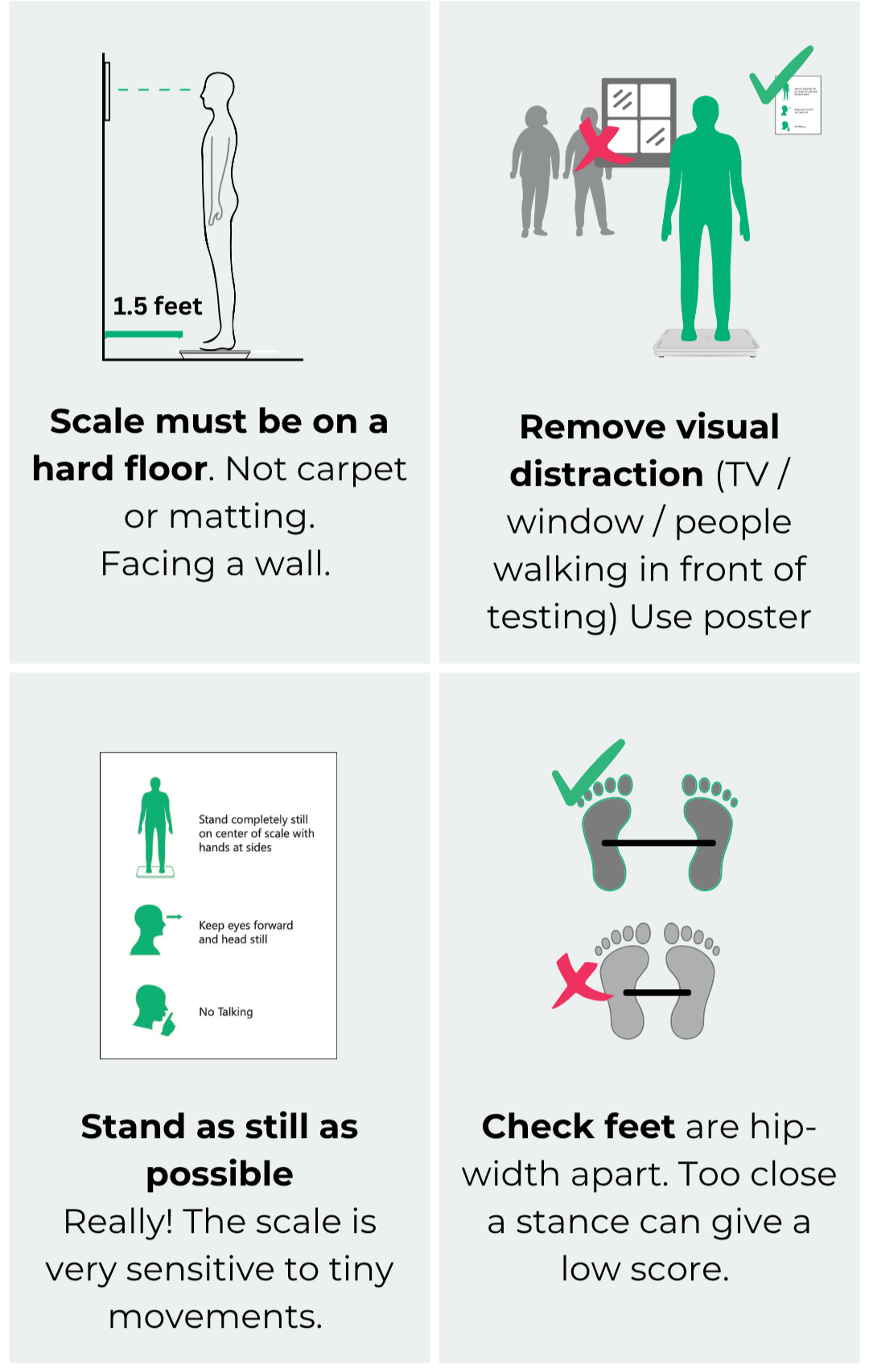
🟩 Script for patient care:
“This device measures the tiny movements your body makes. You must stand as still as you can for 1 minute. Breathe normally, keep your eyes open, head and arms still. Do not talk during the test. I will tell you when the test is over.”
⏲️ [as scale beeps at the start of the test] say “Your test is starting now”
🟩 After the test:
🔊 At the end of the test, the scale will beep and display the score. Operator should record the score according to your company protocol (eg Zibrio Score Spreadsheet, EHR, etc)
0️⃣ Operator should record zero score for incomplete test (if patient cannot stand unsupported for whole test)
📄 The post test sheet explains what the result means, personal and environmental factors that affect balance and how it can change from one day to another.
Key messaging for patient care:
Age alone does not predict fall risk or balance ability
Balance changes daily; each test is meaningful, just like blood pressure
It’s never too early to measure your balance
It’s never too late to improve your balance
Important: This is a powerful new technology and Zibrio has created valuable resources for you to implement this tool successfully. All staff using Stability scales should watch the videos in the Zibrio portal on accurate testing and interpretation of scores.
Scale Operation FAQ
-
If the weight is wrong / too low, the scale needs calibration.
Visit www.zibrio.com/calibrate
-
If the scale shows 0.0 when someone is standing on it, it needs calibration. Visit www.zibrio.com/calibrate
-
If the scale doesn’t initiate automatic balance test, check to see if you have the Balance Coach app open and connected (scale will default to starting the test via the app if it is connected).
-
If the patient is moving too much, the balance test will not start. Have the patient step off and step back on. Have them stand still and you should expected the test to start.
-
As a professional user, you do not need the Balance Coach app (To learn about using the app as a professional user, click here)
Zibrio Portal Access:
if your company has any of these services, your staff qualifies for access to the Zibrio Portal, with updated resources, training, patient/client educational materials and more. Please email support@zibrio.com , stating your company, location, names & emails of staff members to request access for them.
Fall Reduction Program (aka Better Balance Program) for Senior Living Communities
Fitness Bundle
Report Bundle
Clinical Bundle